
 OpenPost
Lemmy

Post discussions and links to Lemmy communities, then follow the conversation.
Lemmy organizes publishing around communities. In OpenPost, the community is the destination: one rendition pairs one connected account with one concrete community and carries its own title, body, validation, published URL, and delivery result.
Connect an instance account
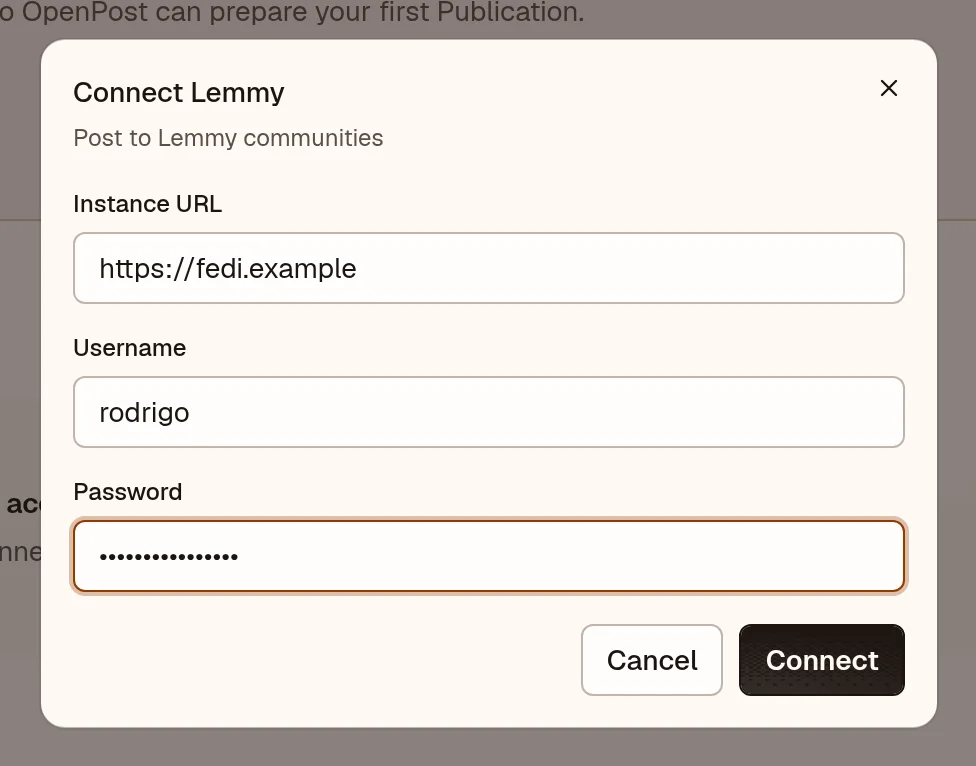
Lemmy needs no developer app or callback URL. Each person connects with their instance username and password. OpenPost exchanges the password once for a token and never stores it.
- In OpenPost, choose your workspace and open Settings → Workspace → Social accounts → Lemmy.
- Enter the home instance address (such as
https://lemmy.world), your username, and your password. Your home server resolves every community you post to, including communities hosted elsewhere. - Publish a test discussion and open the resulting link from its publication details.
OpenPost publishes through the Lemmy v3 API used by the 0.19 series. Instances on Lemmy 1.x, which moved to a v4 API, are refused with an explicit error until a v4 adapter is certified.
Post to a community
A community post needs a community and a title written for that community. The body is Markdown-capable discussion text; an optional link or uploaded image can accompany it. Lemmy allows a link and body together, and OpenPost does not force a link-or-text choice.
Search for the community, paste its address (!name@instance), or choose a saved destination. The selected community's description and rules stay alongside the editor, and OpenPost rechecks posting restrictions before submission. Communities that restrict posting to moderators are rejected with an explicit error instead of a failed delivery.
One community gets one rendition. To adapt a post for another community, create another rendition and review it on its own. A publication with an unresolved community cannot be scheduled.
Follow the conversation
Proper community support includes the replies. Open the post's inbox in OpenPost to read comments and reply without leaving, and to like comments you want to endorse. A submission accepted by your home server, a post confirmed visible at the remote community, and a later moderation change are distinct states. If a remote post disappears through moderation or instance blocks, OpenPost reports it. It never reposts automatically.
If the connection fails
- Check the home instance address, username, and password. Posting to a remote community never needs an account on that community's server.
- If a community cannot be resolved, check its exact address. The same community viewed through different servers is one destination; two communities with the same name on different origins are different destinations.
- If publishing fails after a successful connection, open the failed rendition in OpenPost. Community restrictions and instance blocks are reported there.